
画像生成は Stable Diffusion が有名です。ローカルPC上で画像作成を行います。
学習済みモデルは andite/pastel-mix を使用します。
プログラミングと出力結果
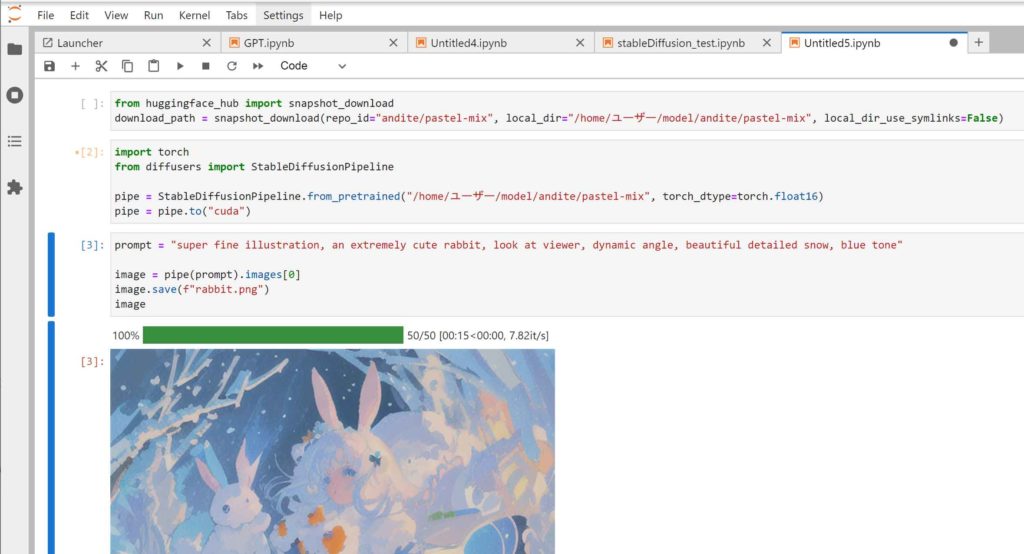
事前学習データのダウンロード
オフラインでも実行できるように、学習済みデータをダウンロードします。
from huggingface_hub import snapshot_download
download_path = snapshot_download(repo_id="andite/pastel-mix", local_dir="/home/ユーザー/model/andite/pastel-mix", local_dir_use_symlinks=False)
local_dir には保存先のディレクトリを指定します。
学習データの読み込み
ダウンロードした学習済みデータを指定して、読み込みます。
import torch
from diffusers import StableDiffusionPipeline

pipe = StableDiffusionPipeline.from_pretrained("/home/ユーザー/model/andite/pastel-mix", torch_dtype=torch.float16)
pipe = pipe.to("cuda")
画像の生成
prompt にキーワードを入力すると、画像が生成されます。
prompt = "super fine illustration, an extremely cute rabbit, look at viewer, dynamic angle, beautiful detailed snow, blue tone"

image = pipe(prompt).images[0]
image.save(f"rabbit.png")
image
アイキャッチ画像は「CompVis/stable-diffusion-v1-4」を用いて、プロンプト「Blue sky, white clouds, splashing sea waves, Double exposure, 1/1000 sec shutter speed」で計算した結果
コメント